
Clawd Calendar
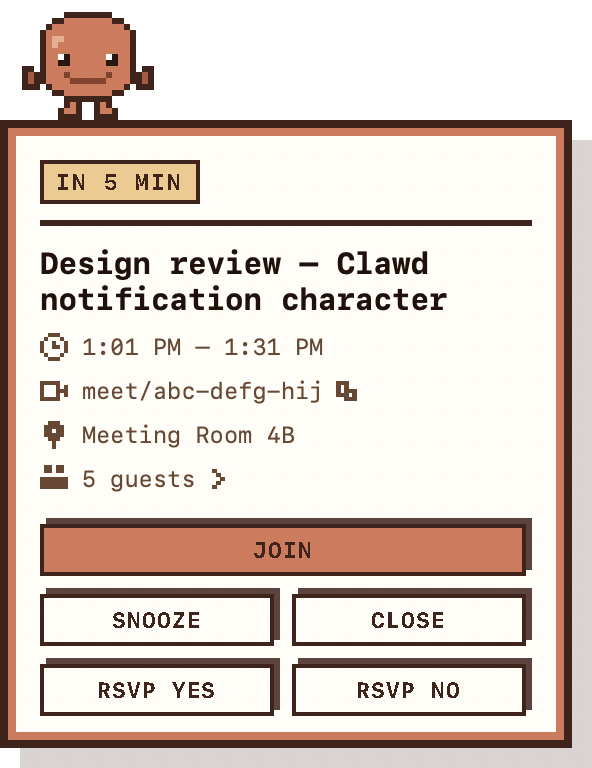
Clawd Calendar is a free macOS app that reminds you about your Google Calendar meetings before they start. It sits in your menu bar, reads the upcoming events from your Google Calendar, and puts a reminder on screen a few minutes before each one — showing the meeting's time, its join link, the room and the guest list, with buttons to join the call, RSVP, snooze or dismiss.
What it is for
Meeting reminders are easy to miss. A banner appears in the corner of the screen, is dismissed without being read, and the meeting starts without you. Clawd Calendar exists to solve that one problem: it makes the reminder impossible to overlook, and it puts everything you need to act on — the join link, the RSVP — inside the reminder itself, so you never have to go and open Google Calendar.
The reminder takes the form of a pixel character who walks in from the edge of the screen carrying a whiteboard. It replaces a rectangle you ignore with a character you don't.
What it does
- Floats over every app, every Space, and full-screen windows — so it reaches you in Slack, in a terminal, in a video call.
- Shows the meeting title, start and end time, the join link, the room, and the guest list with each person's reply.
- Join opens the meeting link. RSVP Yes / No writes your reply back to Google Calendar.
- Snooze brings it back in a few minutes. It never disappears on its own — only you dismiss it.
- Choose how far ahead to be reminded, skip meetings you've declined, and skip events where you're the only guest.
What Google data it uses, and why
Clawd Calendar asks for two scopes. It cannot do its job without either, and it asks for nothing else.
.../auth/calendar.events
Reads your upcoming events so it knows what to remind you about and what to put on the whiteboard, and writes back your response when you press RSVP Yes or RSVP No. The read-only scope would make the RSVP buttons impossible, and RSVP-from-the-reminder is a core feature.
.../auth/userinfo.email
Reads only your email address, so the menu can show which Google account is connected. Without it the app cannot tell you whose calendar it is watching, which matters if you have more than one account.
Install
Requires macOS 13 or later.
curl -fLO https://clawd.workwithdhruv.site/latest.zip
ditto -x -k latest.zip /Applications/
xattr -dr com.apple.quarantine /Applications/ClawdCalendar.app
open /Applications/ClawdCalendar.app
Then: menu bar → Connect Google account… → pick your account → approve. Turn on Launch at login from the same menu so it is there after a reboot.
The xattr step is needed because the app is signed ad-hoc rather
than notarised by Apple. It removes the download quarantine flag so macOS will
open it.
Support
Questions, bug reports, or anything else: dhruvsingh2084@gmail.com.